

Introduction: Why Apollo.io in 2025?
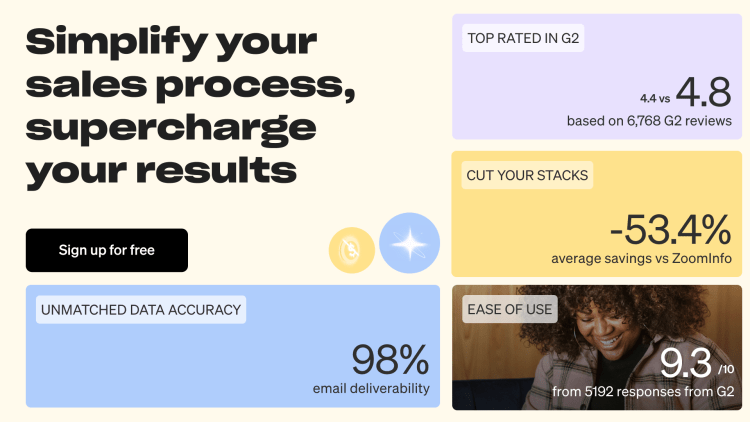
If you’re in sales, marketing, or business development, you’ve probably heard of Apollo.io. It’s not just a database. It’s a complete B2B go-to-market (GTM) platform that helps you:
Find verified leads and decision-makers.
Send personalized cold emails.
Run multi-channel sequences (email + LinkedIn + calls).
Track meetings booked and pipeline impact.
But here’s the truth: most people only use 20% of Apollo’s power. That’s why I’m writing this Complete Guide on How to Use Apollo.io—to show you the step-by-step process to go from zero → booked meetings, even if you’re new.
Fast Track: You can try Apollo.io right now with our referral link → Start Apollo.io Here
1. What is Apollo.io?
(How to Use Apollo.io)
Apollo.io is an all-in-one B2B GTM platform with:
Data: 275M+ contacts & 70M+ companies.
Engagement: Sequences, email sending, LinkedIn workflows, dialer.
Automation: Smart lists, triggers, integrations.
CRM Lite: Track deals, stages, activities if you don’t use Salesforce/HubSpot.
Think of it as:
👉 ZoomInfo (data) + Outreach.io (sequences) + Lusha (verification) + HubSpot Lite (CRM)—all in one dashboard.
And best part? It’s affordable for SMBs/startups, unlike legacy tools that cost $$$ thousands monthly.
2. Why Choose Apollo.io?
(How to Use Apollo.io)
✅ Pros
Huge, constantly updated database.
Affordable plans with free tier.
Built-in outreach tools (email + LinkedIn + dialer).
Strong integrations (HubSpot, Salesforce, Slack, Zapier).
Easy to learn, even for solo founders or SDRs.
❌ Cons
UI can feel complex at first.
Some emails still bounce (need verification).
Works best when paired with clear ICP + strategy (not a magic button).
3. How to Use Apollo.io – The 10-Step Setup Guide
This is the heart of the guide. Follow these 10 steps and you’ll have your Apollo workspace generating meetings in under 2 weeks.
Step 1: Create Your Account
Sign up via our referral link → Start Apollo.io Free
Choose “Sales” or “Business Development” as your role.
Connect your work email (avoid Gmail/Yahoo for serious outreach).
Verify your domain & set up SPF/DKIM/DMARC for deliverability.
Step 2: Connect Integrations
Email: Connect Gmail, Outlook, or custom SMTP.
Calendar: Sync with Google/Outlook calendar for auto-bookings.
CRM: HubSpot, Salesforce, Pipedrive.
Other tools: Zapier, Slack, Zoom.
Step 3: Build Your ICP (Ideal Customer Profile)
Apollo.io works best when you’re laser-targeted. Example ICP for an AI SaaS:
Industry: SaaS & IT services.
Geography: USA, UK, Canada.
Company Size: 50–500 employees.
Buyer Persona: VP Sales, Head of Demand Gen, Growth Marketer.
Tech Stack: Salesforce + HubSpot.
👉 Save as a Smart List so Apollo updates it automatically.
Step 4: Find & Verify Leads

Use Company Filters: revenue, headcount, location.
Use Contact Filters: title, seniority, department.
Add Technographic Filters: CRM, marketing automation, funding stage.
Click Export to List → verify emails.
Step 5: Enrich with Context
(How to Use Apollo.io)
Pull in LinkedIn profiles.
Add direct dial phone numbers.
Note down recent trigger events (funding, hiring, product launch).
Step 6: Write Cold Email Templates
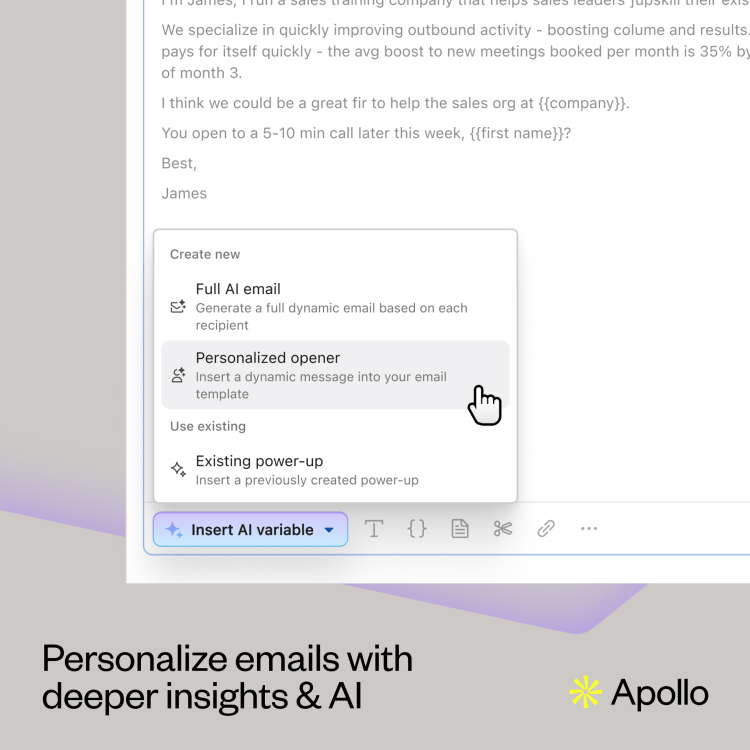
Template 1: Trigger Event Opener
Subject: Congrats on {trigger}
Hi {First},
Saw {Company} just {event}. Teams in your space usually face {pain}.
We helped {peer} get {result}.
Worth a 12-min teardown?
— {Your Name}
Template 2: Problem-Solution
Subject: Fix {pain} in {time}?
Hi {First},
Most {persona}s I talk to are losing {cost} due to {problem}.
We solved it at {peer company} → {result}.
Open to exploring for {Company}?
— {Your Name}
Step 7: Build a Multi-Channel Sequence
Recommended cadence (10 touches over 14 days):
Email (Day 1)
LinkedIn View + Follow (Day 2)
Email (Day 3)
LinkedIn DM (Day 4)
Call + Voicemail (Day 5)
Email (Day 7)
LinkedIn Comment (Day 8)
Call (Day 9)
Email (Day 11)
Final Breakup Email (Day 14)
Step 8: Dialer Setup (Optional but Powerful)

Add credits to Apollo Dialer.
Use Local Presence Numbers for higher pick-up rates.
Keep voicemails <12s, focusing on one value + one outcome.
Step 9: Reporting & Optimization
Track weekly:
Open rates (>50%)
Reply rates (>8%)
Meeting rates (>3%)
Bounce rate (<3%)
A/B test subject lines, CTAs, and PS lines.
Step 10: Team Collaboration
SDRs book meetings.
AEs handle discovery calls.
Managers track dashboards.
💡 CTA: Start your Apollo.io journey today → Get Apollo.io Now
4. Writing Cold Emails That Convert
Keep it short (75–100 words).
Use 1 insight per email.
Add a custom PS line.
Don’t use attachments or spammy links.
5. Apollo.io for LinkedIn Outreach
Export contacts → LinkedIn URL.
Auto-create tasks: View profile, connect, DM.
Add social touches inside your sequence.
6. Using Apollo.io Dialer
Perfect for call-heavy teams.
Integrates directly into workflows.
Log calls + outcomes automatically.
7. Reporting & Analytics
See which ICP lists are converting.
Compare email templates.
Track meeting → opportunity → revenue.
8. Common Mistakes to Avoid
Buying Apollo but not defining ICP.
Sending long, spammy emails.
Scaling before warming up domains.
Ignoring bounce rates.
9. Your 14-Day Execution Plan
Day 1–2: Setup + verify domain.
Day 3–4: Build ICP & Smart Lists.
Day 5: Write 3 email templates.
Day 6–7: Create 10-touch sequence.
Day 8–9: Launch with 50 contacts/day.
Day 10–11: Add LinkedIn touches.
Day 12–13: Add dialer calls.
Day 14: Analyze results, optimize.
10. Pricing & Best Plan
Free Plan → 250 credits/month.
Basic → For solo founders.
Professional → For SDR/AE teams.
Organization → Enterprise-level.
👉 Pro Tip: Start with Professional Plan if you’re serious about outbound.
Referral CTA: Get started with Apollo.io at a discount → Click Here
FAQ
(How to Use Apollo.io)
Q: Is Apollo.io a CRM?
A: It has light CRM, but works best integrated with Salesforce/HubSpot.
Q: Can I use it just for LinkedIn?
A: Yes, you can pull profiles + emails + add LinkedIn steps.
Q: Is Apollo.io better than ZoomInfo?
A: ZoomInfo is enterprise-level (expensive). Apollo is SMB-friendly with outreach included.
Final Verdict
(How to Use Apollo.io)
Apollo.io is the most complete, affordable B2B sales engine in 2025. When used right, it’s not just a database, it’s your end-to-end pipeline generator.
Stop guessing, stop spamming. Follow this guide, and in 14 days you’ll see real meetings on your calendar.
👉 Start today with our referral link → Get Apollo.io Now
Related Blogs Section:
Gamma.ai Review 2025 – Create Presentations, Docs & Webpages 10x Faster (Honest Guide)
- Perplexity Review 2025
- Gemini Review 2025
Related Blogs:
India’s Top 25 Large Companies to Work For in 2025: Insights from LinkedIn’s Latest Rankings
Work From Home Opportunity in India: My Honest Review of SquadStack for Remote Job Seekers
Hostinger Web Hosting Honest Review 2025: Is It Worth Your Money?
Apollo.io Review 2025: Honest, Hands-On Guide to Pricing, AI Features, and Real Results
Hostinger Horizon Website Builder 2025 : The Complete Expert Guide for Building a High-Performance Website
Previous Blogs:
Top Emerging Markets for Solar Energy in 2025
Building-Integrated Photovoltaics (BIPV): The Future of Solar Energy in Architecture
How AI and IoT are Transforming Solar Plant Operations
Best Solar Companies in India and Why?
Affordable Solar Solutions in India
Claude Review 2025: The Thoughtful AI That Reads Like a Human – Complete Guide for Writers, Researchers & Business Pros
Disclaimer
This guide contains affiliate/referral links (e.g., Apollo.io). If you sign up via our link, we may earn a small commission at no extra cost to you.
Discover more from Technosys Blogs
Subscribe to get the latest posts sent to your email.
